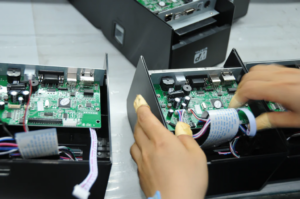
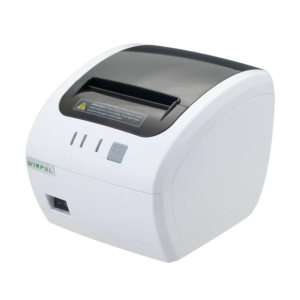
In our experience at Winpal, setting up a thermal receipt printer can be straightforward when following the right steps. As a thermal printer manufacturer, we understand the importance of ensuring that devices are correctly configured for smooth operations in busy retail, logistics, or hospitality environments. Our team has designed the WP300W 80mm Thermal POS Printer to provide reliability and versatility, supporting 58mm or 80mm paper widths, online firmware upgrades through the IAP function, and features that help avoid missed printing orders. Whether you are a distributor, retailer, or system integrator, understanding the setup process ensures your operations remain efficient.
Preparing Your Device for Installation
Before starting, we recommend ensuring all components are available and inspected. With WP300W, it is important to verify connections, including power and USB or network interfaces. As one of the trusted thermal printer suppliers, we emphasize that proper positioning and stable power are essential for consistent printing performance. Our printer includes a beeper and light alarm function, which not only notifies the operator of errors but also assists in maintaining workflow continuity. Checking that paper rolls are correctly inserted according to the supported width helps prevent operational interruptions and ensures queue management functions perform as expected.
Software Configuration and Connectivity
After the hardware is ready, connecting the WP300W to your POS or computer system is the next step. Our company provides a detailed instruction manual available on the download page to guide the installation of drivers and management software. This printer supports queuing, reprint, and order reminder functions, which can be configured through the software interface. As a receipt maker machine developer, we advise testing print commands immediately after setup to verify alignment and communication between your system and the printer. Ensuring firmware is up-to-date with the IAP function optimizes performance and maintains compatibility with various point-of-sale applications.
Optimizing Use and Maintenance
Once installed, routine maintenance is key to long-term reliability. We recommend monitoring the beeper and light alarm signals to quickly respond to printing errors. Our WP300W Thermal POS Printer supports functions that prevent missed orders and alert the operator to issues, minimizing downtime in fast-paced environments. From our perspective as thermal printer suppliers, providing guidance on paper types, cleaning procedures, and software updates is an essential part of our service. Offering OEM and ODM customization allows us to tailor solutions to unique client requirements, enhancing overall productivity.
Conclusion
We at Winpal are committed to helping our customers set up their thermal receipt printers efficiently. By following proper installation and software configuration steps, users can maximize the features of the WP300W 80mm Thermal POS Printer, including order queuing, reprint, and error alerts. Our integrated approach, from controlled supply chain to technical support, ensures our clients in the retail, logistics, and hospitality sectors receive reliable and versatile printing solutions. Choosing Winpal as your receipt maker machine and POS receipt printer provider guarantees a seamless installation experience and consistent performance across operations.