Efficiency is essential in the fast-paced commercial world of today. Reliable and quick receipt printing is one way that companies may greatly increase production. As a trusted receipt printer manufacturer, Winpal provides top-notch printing solutions, with the WP-A4 80mm POS Receipt Printer being a top choice for businesses of all sizes. This guide will show you how to easily connect your receipt maker machine to your computer for seamless integration and optimal performance.
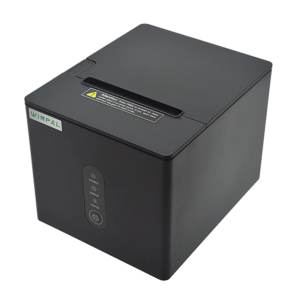
Setting Up Your WP-A4 Printer for Seamless Integration
Before diving into the connection process, it’s important to understand the basic setup of your Winpal WP-A4 80mm POS Receipt Printer. Unbox the printer and ensure that all parts, including the power supply and cables, are present. The WP-A4 is designed for quick deployment in any business environment, whether retail, restaurant, or other service industries.
Next, install the necessary Winpal drivers and software on your computer. These drivers are essential for ensuring the receipt maker machine works efficiently with your business system, including POS software. Once installed, power up the printer and run an initial test to confirm that everything is working correctly. This simple process ensures that you’re ready to go without any downtime.
Connecting the WP-A4 Receipt Printer to Your Computer
Now, let’s walk through the steps to connect your WP-A4 receipt printer to your computer. There are two main methods for this connection:
- USB Connection: This is the most straightforward method. Simply connect the WP-A4 to your computer using the provided USB cable. This direct connection allows for fast and reliable receipt printing, ensuring that your business transactions are processed quickly and without errors.
- Bluetooth Connectivity: For businesses looking for more flexibility, the WP-A4 also supports wireless Bluetooth connectivity. This option eliminates the need for cables and gives you more freedom in arranging your workspace. Whether you’re setting up a mobile POS system or placing the printer in an out-of-the-way location, Bluetooth connectivity provides the flexibility you need.
Additionally, the WP-A4 supports a wall-hanging function, making it an excellent choice for businesses with limited counter space, such as small retail stores or food service environments.
Maximize Your Printer’s Efficiency with Winpal’s IAP Online Upgrade
To keep your Winpal WP-A4 80mm POS Receipt Printer running at peak performance, take advantage of our IAP online upgrade feature. This upgrade ensures that your printer’s firmware is always up-to-date, providing you with the latest features and improvements.
If you encounter any issues during the connection process or as you use the printer, Winpal’s customer support team is available to assist you. With troubleshooting tips and personalized help, you can quickly resolve any technical issues and maintain continuous uptime, ensuring your business operations run smoothly.
Conclusion: Winpal’s WP-A4 Printer – The Reliable Choice for Your Business Needs
Connecting a Winpal WP-A4 80mm POS Receipt Printer to your computer ensures smoother and faster receipt printing, which directly improves your business productivity. Whether through a USB connection or Bluetooth, the WP-A4 is designed for efficiency and ease of use. As a leading receipt printer manufacturer, we continue to provide businesses with the tools they need to optimize their receipt printing processes and achieve seamless operations. Trust us for all your receipt printing needs and enjoy the reliability and performance that comes with every product.